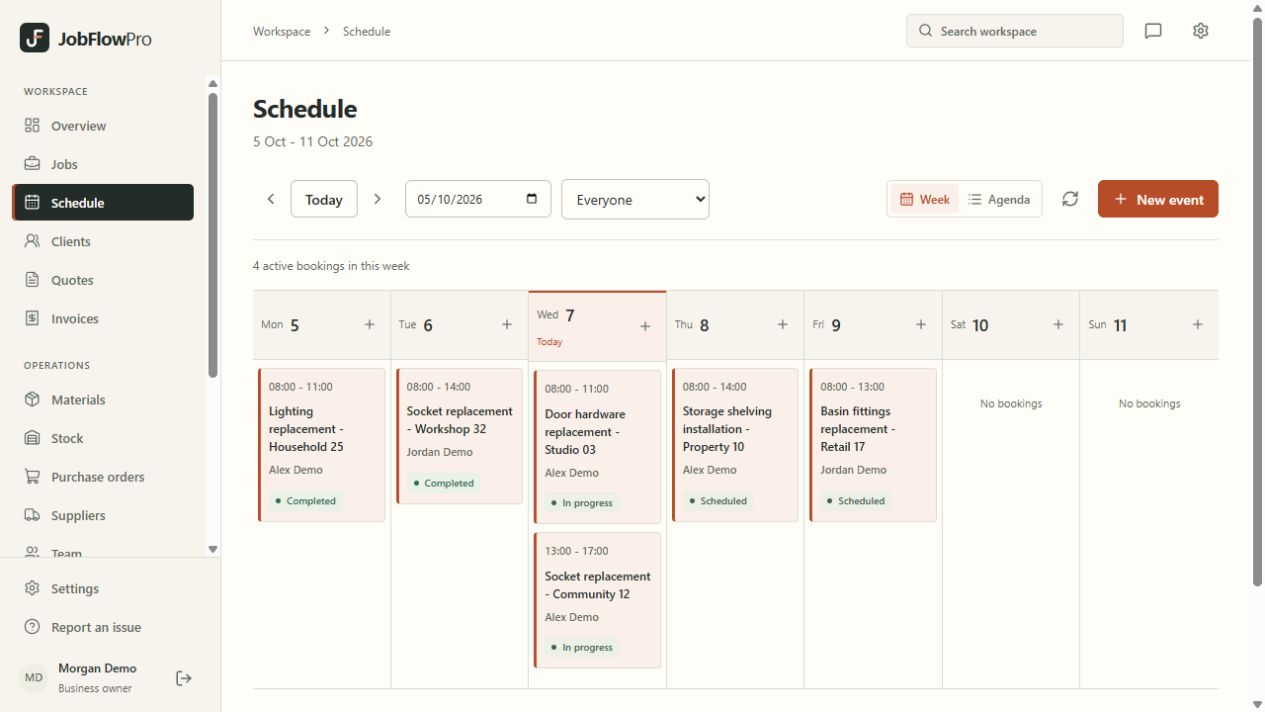
Schedule visits, not just reminders.
Some jobs take one appointment. Others need a survey, installation and a return visit. Organise the visits against the same job so each booking carries the wider context.
Keep the site details and description of work up to date. A calendar entry is more useful when the person attending can find the information needed for that visit.
- Visits linked to the relevant job
- Team assignments and scheduled dates
- A shared view of planned work
Give each person their part of the day.
Invite team members with individual logins and the appropriate role. Field users can see their assigned visits and job details through the mobile browser, while authorised office users manage the broader schedule.
A web-based schedule helps the team refer to the current record. Everyone needs a working connection, and changes should still be communicated directly when timing is critical.
Keep return visits understandable.
When work needs another visit, record why and what remains to be done. Notes linked to the job help avoid asking a customer to explain the same issue again.
Review upcoming appointments alongside the work already recorded. Check materials, access arrangements and who is available before confirming plans with the customer. JobFlowPro supports this review; it does not guarantee travel times or automatically optimise routes.
Make the weekly review useful.
Start with unfinished jobs and their next planned visit. Check whether each appointment has an assigned person and enough detail for the work to begin. Then review changes and gaps in the week.
Use a consistent process for updating the job after a visit. That gives the office a clearer basis for booking follow-up work and preparing invoices.
- Check the next action for open jobs
- Confirm team and site access arrangements
- Keep the job record current after the visit